| javascript & Ajax |
| AJAX stands for Asynchronous JavaScript and XML. What is AJAX?(web) |
|
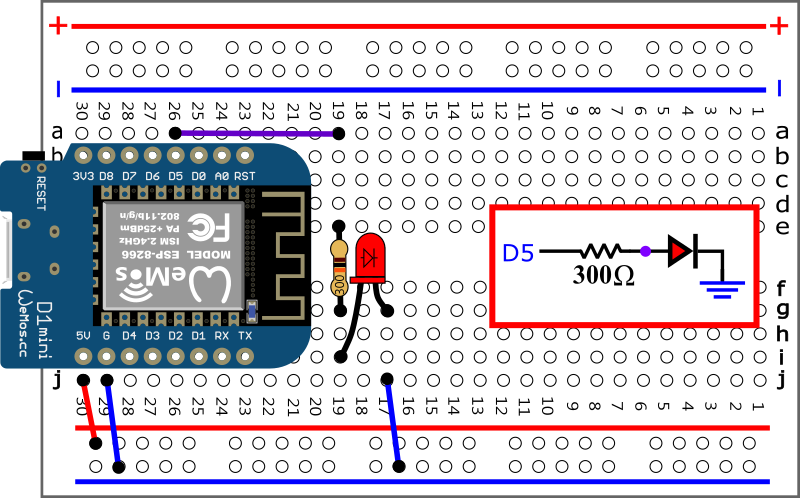 |
| 若 使用 D1 mini 上的LED 接腳 D5 |
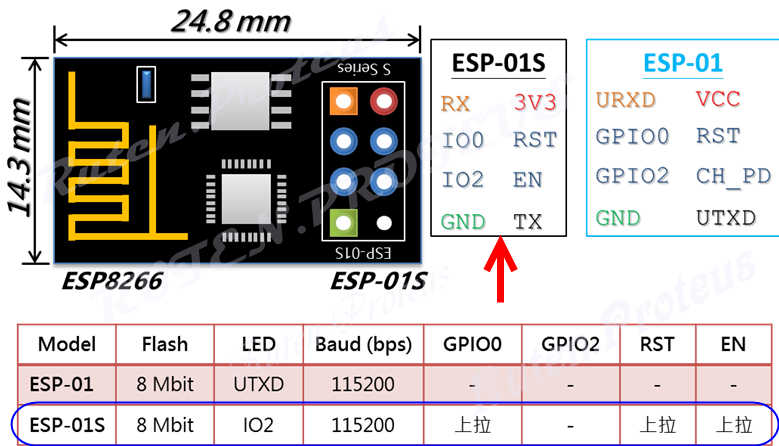 GPIO2 0 LED亮 GPIO2 1 LED熄 |
| ESP8266 : JavaScript and AJAX |
AJAX : working(0:54)(Youtube)(here)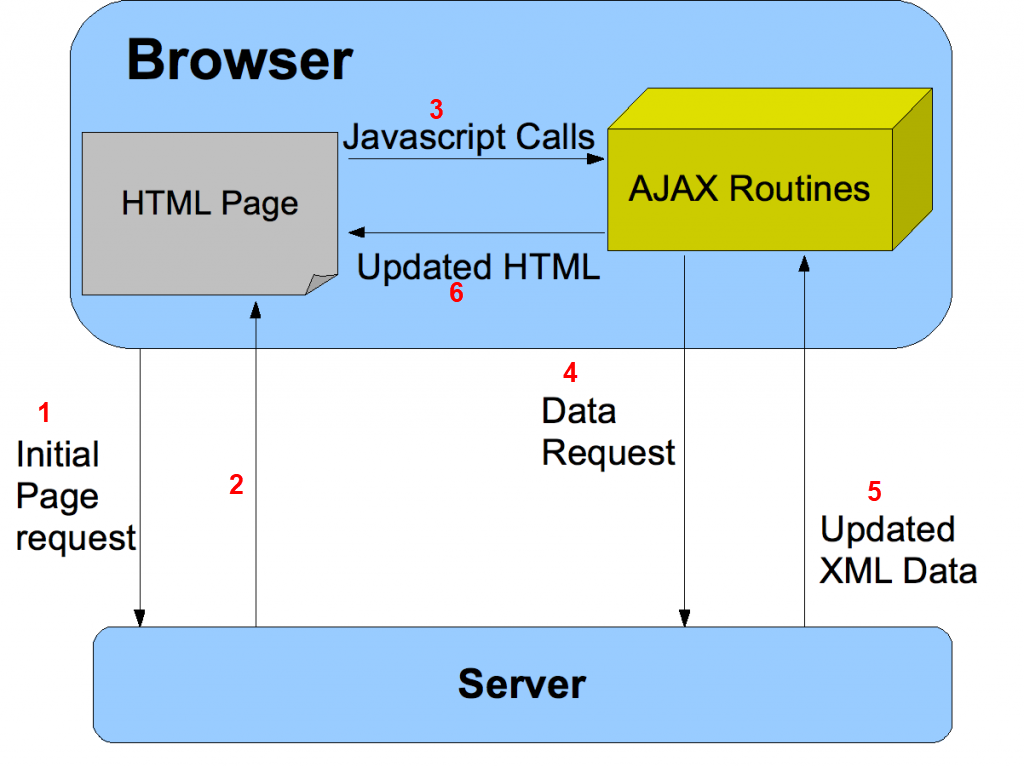 
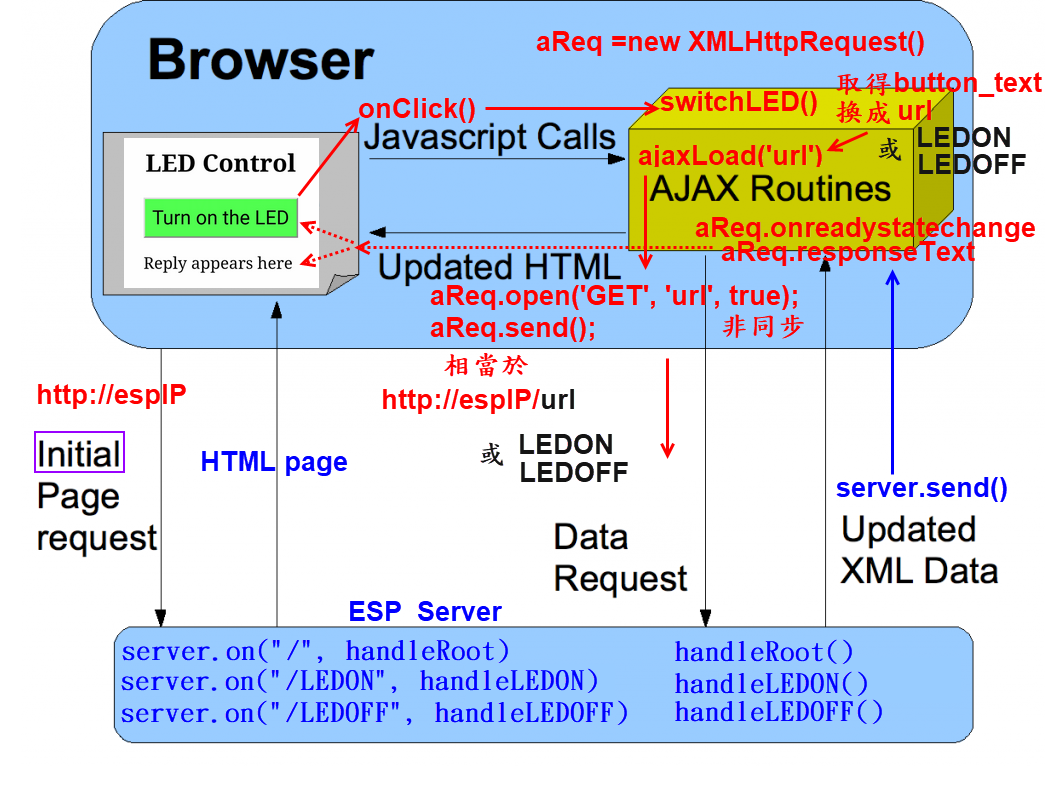
AJAX uses JavaScript and is a way for websites to get data without reloading a whole page. AJAX is a developer's dream, because you can: 1. Update a web page without reloading the page 2. Request data from a server - after the page has loaded 3. Receive data from a server - after the page has loaded 4. Send data to a server - in the background Using AJAX we can receive and send packets of data behind the scenes either automatically or when an event, like a button click, take places. e.g. When the button is clicked, instead of loading a whole new page the page will send just the data required to switch the LED. AJAX Introduction(w3school) |
   |
 |
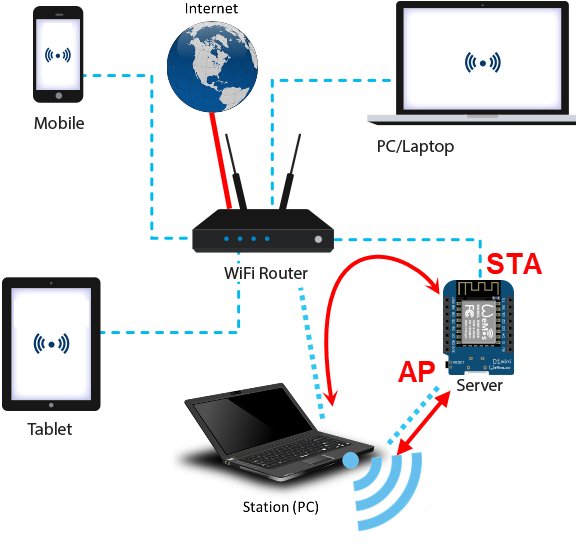
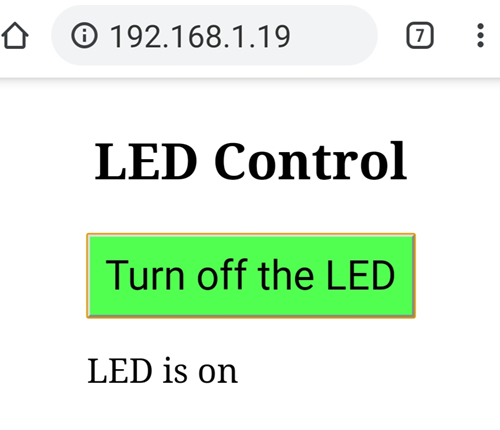
| //Example 1 //修改藍色部分 /* yourRouterSSID yourRouterPassward IPGGx- */ //開啟手機熱點分享 //打開WiFi搜尋IPGGx-後之IP //打開瀏覽器連入IP #include <ESP8266WebServer.h> #define ssid "yourRouterSSID" //手機熱點分享SSID #define password "yourRouterPassward" //手機熱點分享密碼 #define LED_Pin 2 ESP8266WebServer server(80); String html = R"=====( <!DOCTYPE html> <html> <head> <meta name='viewport' content='width=device-width, initial-scale=1.0'/> <meta charset='utf-8'> <style> body {text-align: center;} input {font-size: 36px;background-color: #50FF50;} p {font-size: 24px;} </style> <script> var aReq = null; if (window.XMLHttpRequest) { aReq =new XMLHttpRequest(); } else { aReq =new ActiveXObject("Microsoft.XMLHTTP"); } function switchLED() { var button_text = document.getElementById("LED_button").value; if (button_text=="Turn on the LED") { ajaxLoad('LEDON'); } else if(button_text=="Turn off the LED") { ajaxLoad('LEDOFF'); } } function ajaxLoad(ajaxURL) { if(!aReq) { alert("AJAX is not supported."); return; } aReq.onreadystatechange = function() { if(aReq.readyState == XMLHttpRequest.DONE) { var ajaxResult = aReq.responseText; if ( ajaxResult == "LED is on" ) { document.getElementById("LED_button").value = "Turn off the LED"; document.getElementById("reply").style.color = "#ff0000"; } else if ( ajaxResult == "LED is off" ) { document.getElementById("LED_button").value = "Turn on the LED"; document.getElementById("reply").style.color = "#0000ff"; } document.getElementById("reply").innerHTML = ajaxResult; } } aReq.open("GET",ajaxURL,true); aReq.send(); } </script> <title>LED Control</title> </head> <body> <h2>LED Control</h2> <input type="button" id = "LED_button" onclick="switchLED()" value="Turn on the LED" /> <p id = "reply">Reply appears here</p> </body> </html> )====="; void handleRoot() { digitalWrite(LED_Pin,HIGH); server.send(200, "text/html", html); } void handleLEDON() { digitalWrite(LED_Pin, LOW); server.send(200, "text/plain", "LED is on");//esp-->aReq /*ESP server送出"LED is on" 給client 端 (由代理人ajaxRequst收) 即: 代理人aReq 會收到 "LED is on" (aReq.responseText) */ } void handleLEDOFF() { digitalWrite(LED_Pin, HIGH); server.send(200, "text/plain", "LED is off"); } void setup() { pinMode(LED_Pin, OUTPUT); digitalWrite(LED_Pin,HIGH); WiFi.begin(ssid,password); while (WiFi.status() != WL_CONNECTED) { delay(500); } WiFi.mode(WIFI_AP_STA); WiFi.softAP(String("IPGGx-"+ String((WiFi.localIP().toString()))),""); digitalWrite(LED_Pin,LOW); server.on("/", handleRoot); server.on("/LEDON", handleLEDON); server.on("/LEDOFF", handleLEDOFF); server.begin(); } void loop() { server.handleClient(); }
|
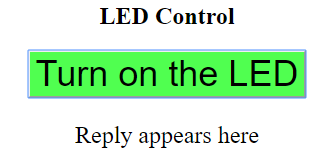
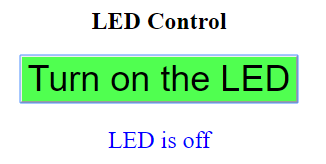
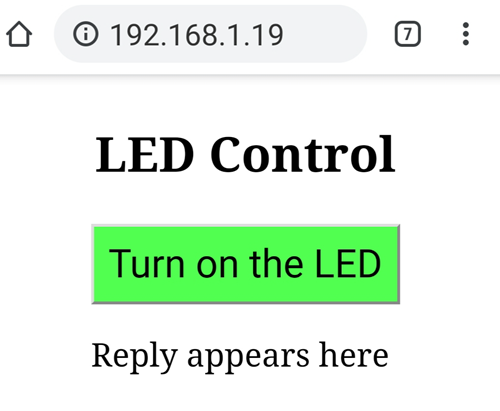
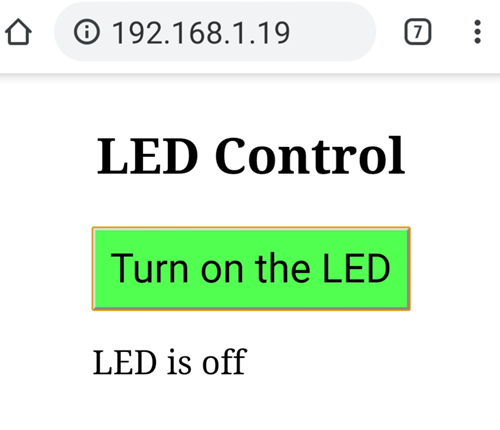
<input type="button" id = "LED_button" onclick="switchLED()" value="Turn on the LED" />
|
function switchLED() { var button_text = document.getElementById("LED_button").value; if (button_text=="Turn on the LED") { document.getElementById("LED_button").value = "Turn off the LED"; ajaxLoad('LEDON'); } else { document.getElementById("LED_button").value = "Turn on the LED"; ajaxLoad('LEDOFF'); } }
|
//Create an XMLHttpRequest Object var aReq = null; if (window.XMLHttpRequest) // code for modern browsers { aReq =new XMLHttpRequest(); } else // code for old IE browsers { aReq =new ActiveXObject("Microsoft.XMLHTTP"); } //(ref) |
//Ajax 代理HTTP web 向ESP server 提出請求 function ajaxLoad(ajaxURL) { aReq.open("GET",ajaxURL,true); aReq.send(); } |
aReq.open("GET",ajaxURL,true); Opens the request channel using GET (the other option is PUT). ajaxURL is the URL or at least the bit to be added to the url. In this case it is the LED control code.('LEDON' or 'LEDOFF') The last value “true” means use an asynchronous request. “false” would mean use a synchronous request. Synchronous requests block the browser (they stop everything until they get a reply). Asynchronous requests don’t block, they allow the browser to do other things while waiting for a the reply. aReq.open("GET",ajaxURL,true); open(method,url,async,user,psw) Specifies the request method: the request type GET or POST url: the file location async: true (asynchronous) or false (synchronous) user: optional user name psw: optional password
|
| Ajax 代理Client端 接收由ESP server 傳來之資料 |
| The onreadystatechange Property(W3school) |
aReq.onreadystatechange = function() { if(aReq.readyState == XMLHttpRequest.DONE) //if(aReq.readyState == 4 && aReq.status==200) { var ajaxResult = aReq.responseText; }
var ajaxResult = aReq.responseText;
|
| 使用mDNS (Multicast DNS) 多播DNS(mDNS)提供在沒有任何傳統單播DNS伺服器的情況下在本地鏈路上執行類似DNS的操作的能力。此外,多播DNS指定DNS名稱空間的一部分可供本地使用,無需支付任何年費,也無需設定授權或以其他方式配置傳統DNS伺服器來回答這些名稱。 |
| //Example 2 #include <ESP8266WebServer.h> #include <ESP8266mDNS.h> #define ssid "yourRouterSSID" #define password "yourRouterPassward" #define LED_Pin 2 #define mDns "espggx" ESP8266WebServer server(80); MDNSResponder mdns; String html = R"=====( <!DOCTYPE html> <html> <head> <meta name='viewport' content='width=device-width, initial-scale=1.0'/> <meta charset='utf-8'> <style> body {text-align: center;} input {font-size: 36px;background-color: #50FF50;} p {font-size: 24px;} </style> <script> var aReq = null; if (window.XMLHttpRequest) { aReq =new XMLHttpRequest(); } else { aReq =new ActiveXObject("Microsoft.XMLHTTP"); } function switchLED() { var button_text = document.getElementById("LED_button").value; if (button_text=="Turn on the LED") { ajaxLoad('LEDON'); } else { ajaxLoad('LEDOFF'); } } function ajaxLoad(ajaxURL) { if(!aReq) { alert("AJAX is not supported."); return; } aReq.onreadystatechange = function() { if(aReq.readyState == XMLHttpRequest.DONE) { var ajaxResult = aReq.responseText; if ( ajaxResult == "LED is on" ) { document.getElementById("LED_button").value = "Turn off the LED"; document.getElementById("reply").style.color = "#ff0000"; } else if ( ajaxResult == "LED is off" ) { document.getElementById("LED_button").value = "Turn on the LED"; document.getElementById("reply").style.color = "#0000ff"; } document.getElementById("reply").innerHTML = ajaxResult; } } aReq.open("GET",ajaxURL,true); aReq.send(); //aReq-->ESP server } </script> <title>LED Control</title> </head> <body> <h2>LED Control</h2> <input type="button" id = "LED_button" onclick="switchLED()" value="Turn on the LED" /> <p id = "reply">Reply appears here</p> </body> </html> )====="; void handleRoot() { digitalWrite(LED_Pin,HIGH); server.send(200, "text/html", html); } void handleLEDON() { digitalWrite(LED_Pin, LOW); /*ESP server送出"LED is on" 給client 代理人ajaxRequst aReq 會收到 "LED is on" ---> aReq.responseText */ server.send(200, "text/plain", "LED is on");//esp-->aReq } void handleLEDOFF() { digitalWrite(LED_Pin, HIGH); server.send(200, "text/plain", "LED is off"); } void setup() { pinMode(LED_Pin, OUTPUT); digitalWrite(LED_Pin,HIGH); WiFi.begin(ssid,password); while (WiFi.status() != WL_CONNECTED) { delay(500); } mdns.begin(mDns, WiFi.localIP()); WiFi.mode(WIFI_AP_STA); WiFi.softAP(String("IPGGx-"+ String((WiFi.localIP().toString()))),""); MDNS.begin(mDns); digitalWrite(LED_Pin,LOW); server.on("/", handleRoot); server.on("/LEDON", handleLEDON); server.on("/LEDOFF", handleLEDOFF); server.begin(); } // void setup() void loop() { mdns.update(); server.handleClient(); } //使用mDNS連線 (Android作業系統不支援mDNS) //http://espggx.local |