人<----->晶片
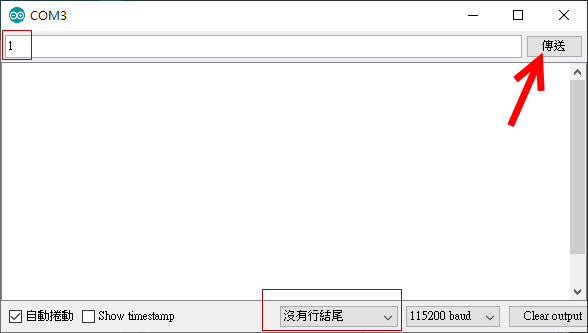
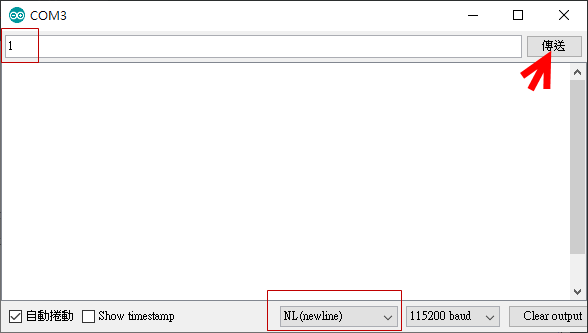
Serial Monitor 與 Arduino 通訊


#define led 12
void setup(){
Serial.begin(115200);
pinMode(led,OUTPUT);
digitalWrite(led,LOW);
}
void loop(){
if(Serial.available()){
    if(Serial.read()==49)
  digitalWrite(led,HIGH);
  else
  digitalWrite(led,LOW);
  delay(2000);
}
}


//試試 Serial.read()==1
//試試 Serial.read()=='1'


Serial monitor 以ASCII code傳送資料

使用Serial.read();讀取序列埠視窗傳來的數字時
1.會回傳ASC II碼
2.將一個數字一個數字讀取,必須使用字串的方式存取傳來的數字
3.翻譯ASC II碼,C語言內有幾個重要的函式可以負責。

先將傳來的數字儲存成字串,再將字串轉換為數字,可透過下表來轉換字串為數字

轉換字串函數 轉換數字 註解
atoi(字串,字數); -32768 ~ 32767 字串轉整數
atol(字串,字數); -2,147,483,648 到 2,147,483,647 字串轉長整數
atof(字串,字數); -3.4028235E+38 至 3.4028235E+38 字串轉浮點數(小數)


//攝氏轉華氏
byte cmd[9] ;
void setup(){
Serial.begin(9600);
Serial.setTimeout(10); // 設定為每10毫秒結束一次讀取(數字愈小愈快)
}

void loop(){
if(Serial.available()){
 Serial.readBytes(cmd,9);
 Serial.println(atof(cmd)*0.6+32);
}
}
cmd 有9個 byte
若於serial monitor 輸入25再傳送
傳了兩個byte 後每隔10ms沒資料進來,就timeout 一次
直到9次 完成讀取動作


使用
Serial.parseInt()(Arduino.cc)
Serial.parseFloat()(Arduino.cc)

void setup(){
Serial.begin(115200);
Serial.setTimeout(10); // 設定為每10毫秒結束一次讀取(數字愈小愈快)
}

void loop(){
if(Serial.available()){
 int x = Serial.parseInt();
 Serial.println(x);

}
}

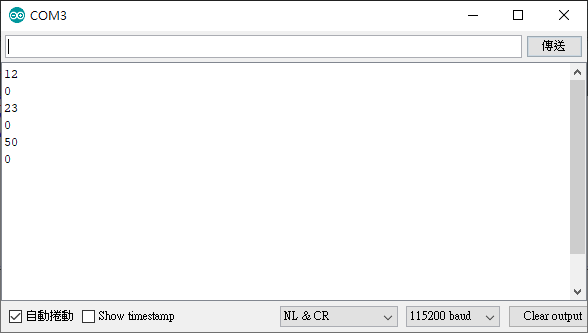
輸入12  23  50


發現每個輸入的數字下方都會有個0,作為輸入結束的代碼


int x,y;
void setup(){
Serial.begin(115200);
Serial.setTimeout(10); // 設定為每10毫秒結束一次讀取(數字愈小愈快)
}

void loop(){
while(Serial.available()){
  x = Serial.parseInt();
  y = Serial.parseInt();
 Serial.print(x);  // 這邊的x就是我們輸入的值
 Serial.print(" , ");
 Serial.println(y); //這邊的y就是回傳的中止碼0
}
}
攝氏轉華氏

float x;
int y;
void setup(){
Serial.begin(115200);
Serial.setTimeout(10); // 設定為每10毫秒結束一次讀取(數字愈小愈快)
}

void loop(){
while(Serial.available()){
  x = Serial.parseFloat();
  y = Serial.parseInt();
  Serial.println(x*0.6+32);  // 這邊的x就是我們輸入的值
}
}

由serial monitor 控制 Servo Motor
#include <Servo.h>
Servo servo;
int x,y;
void setup(){
Serial.begin(115200);
Serial.setTimeout(10); // 設定為每10毫秒結束一次讀取(數字愈小愈快)
servo.attach(9);
}

void loop(){
while(Serial.available()){
  x = Serial.parseInt();
  y = Serial.parseInt();
  Serial.print(x);
 Serial.print(" , ");
 Serial.println(y);
 servo.write(x);
 delay(100);
}
}