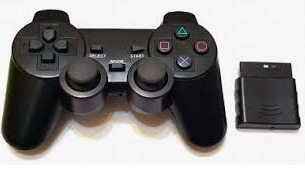
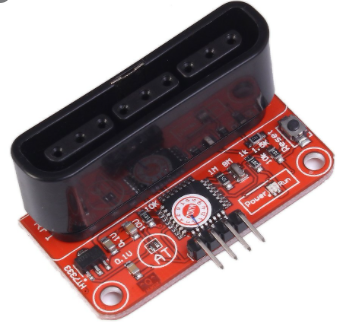
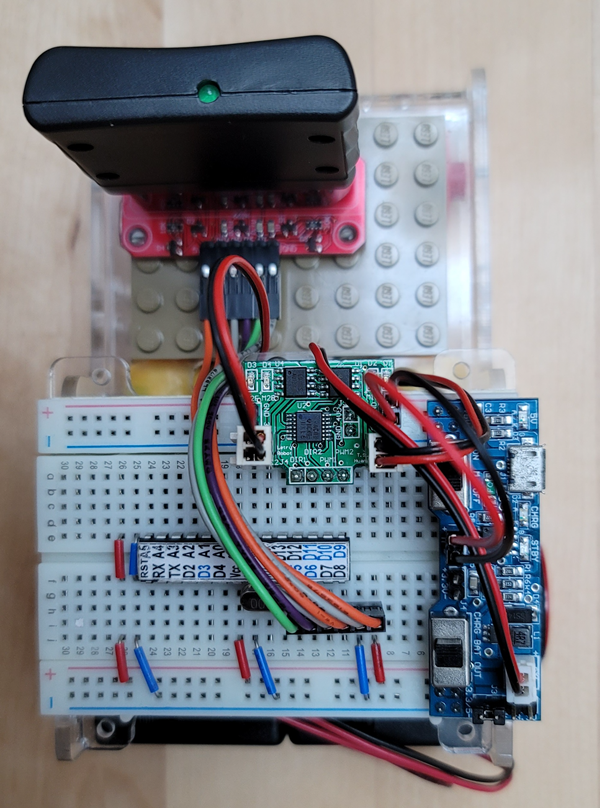
手柄的使用、連接配對說明(不同副廠產品會略有不同)

    PS2手柄由手柄和接收器兩個部分組成,手柄需要兩節AAA 1.5V供電,接收器的電源範圍為3~5V,不能接反,不能超電壓,過壓和反接,都會使接收器燒壞。

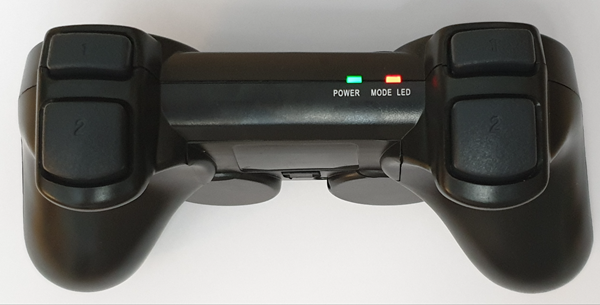
    手柄上有個電源開關,ON開/OFF關,將手柄開關打到ON上,在未搜索到接收器的狀況下,手柄上的燈會不停的閃,在一定時間內,還未搜索到接收器,手柄將進入待機模式,手柄上的燈將滅掉,這時,按下“MODE”鍵,喚醒手柄。

    接收器供電,在未配對的狀況在,綠燈閃。

    手柄打開,接收器供電,手柄和接收器會自動配對,這時接收器燈常亮,手柄配對成功。
按鍵“MODE”(手柄批次不同,上面的標識有可能是"ANALOG",但不會影響使用),可以選擇“紅燈模式”、“綠燈模式”。

若手柄和接收器不能正常配對!
多數問題是,接收器的接線不正確,或程式有問題。

解決方法:接收器只接電源(電源線一定要連接正確),不接任何資料線和時鐘線,一般情況下手柄是能夠配對成功。配對成功後燈常亮,說明手柄是好的。這時再檢查接線是否正確,程式移植是否有問題。


ps2 controller communication protocol(google search)

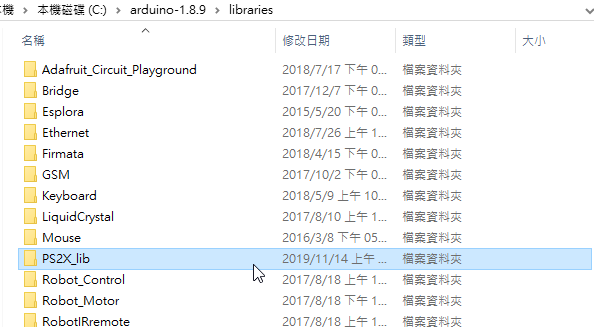
library(GitHub)(.zip)
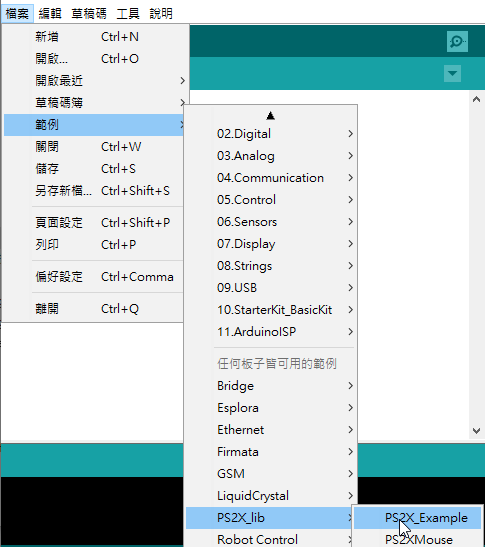
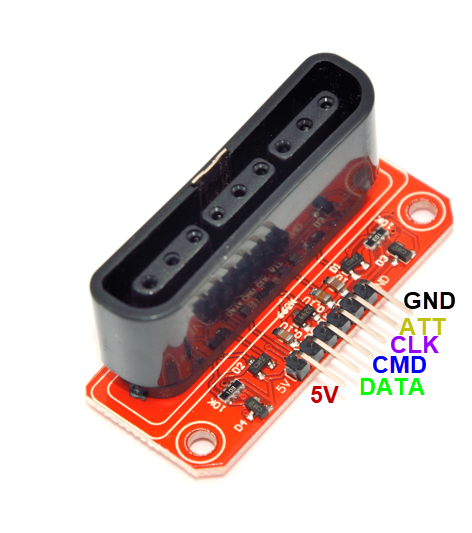
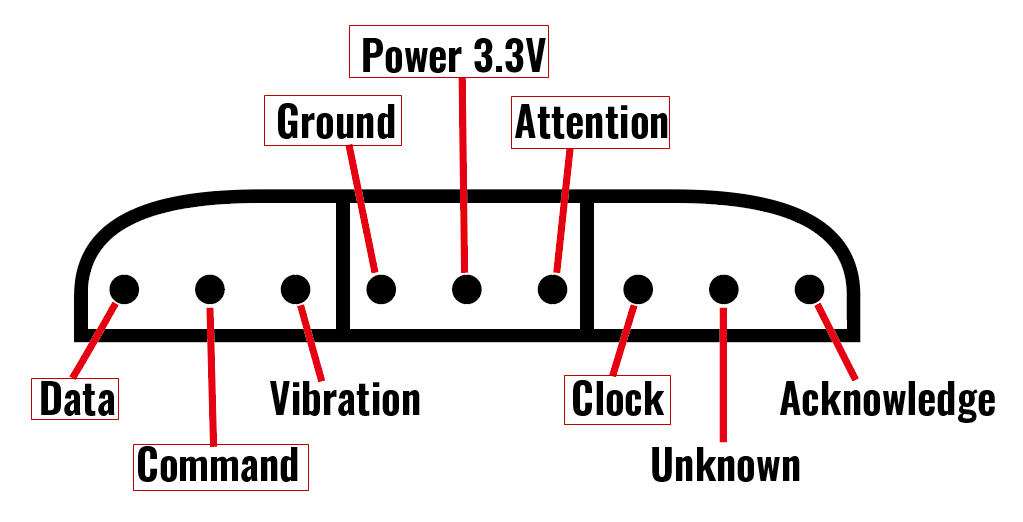


Data(DI):  D8
Command(DO):D7
Clock:D6
Attention(CS):D5

ps2x.config_gamepad(clock, command, Attention, Data, true, true);

//接收器上電 ,controller 按MODE 使MODE LED亮紅燈
//Arduino 重新開機


//read controller and set large motor to spin at 'vibrate' speed
ps2x.read_gamepad(false, vibrate);         

//this will set the large motor vibrate speed based on
//how hard you press the blue (X) button
vibrate = ps2x.Analog(PSAB_BLUE);     


#include <PS2X_lib.h>  //for v1.6
#define PS2_DAT    8  
#define PS2_CMD   7 
#define PS2_CLK    6  
#define PS2_SEL    5 
byte pressures=true;
byte rumble =true;

PS2X ps2x;
int error = 0;
byte vibrate =0;

void setup(){
  Serial.begin(115200);
  delay(1000);
  error = ps2x.config_gamepad(PS2_CLK, PS2_CMD, PS2_SEL, PS2_DAT, pressures, rumble);
  while(error == 1)
  {
   error = ps2x.config_gamepad(PS2_CLK, PS2_CMD, PS2_SEL, PS2_DAT, pressures, rumble);
   delay(300);
  }
   Serial.println("Found Controller, configured successful ");
 
}

void loop() {
    ps2x.read_gamepad(false, vibrate);
    if(ps2x.ButtonPressed(PSB_CIRCLE))       
      Serial.println("Circle just pressed");
    if(ps2x.ButtonReleased(PSB_CIRCLE))       
      Serial.println("Circle just released");
    delay(300);
}

#include <PS2X_lib.h>  //for v1.6
#define PS2_DAT    8  
#define PS2_CMD   7 
#define PS2_CLK    6  
#define PS2_SEL    5 
byte pressures=true;
byte rumble =true;

PS2X ps2x;
int error = 0;
byte vibrate =0;

void setup(){
  Serial.begin(115200);
  delay(1000);
  error = ps2x.config_gamepad(PS2_CLK, PS2_CMD, PS2_SEL, PS2_DAT, pressures, rumble);
  while(error == 1)
  {
   error = ps2x.config_gamepad(PS2_CLK, PS2_CMD, PS2_SEL, PS2_DAT, pressures, rumble);
   delay(300);
  }
   Serial.println("Found Controller, configured successful ");
 
}

void loop() {
    ps2x.read_gamepad(false, vibrate);
    if(ps2x.NewButtonState(PSB_CIRCLE))       
      Serial.println("Circle just changed");
     
    delay(300);
}

#include <PS2X_lib.h>  //for v1.6
#define PS2_DAT    8  
#define PS2_CMD   7 
#define PS2_CLK    6  
#define PS2_SEL    5 
byte pressures=true;
byte rumble =true;

PS2X ps2x;
int error = 0;
byte vibrate =0;

void setup(){
  Serial.begin(115200);
  delay(1000);
  error = ps2x.config_gamepad(PS2_CLK, PS2_CMD, PS2_SEL, PS2_DAT, pressures, rumble);
  while(error == 1)
  {
   error = ps2x.config_gamepad(PS2_CLK, PS2_CMD, PS2_SEL, PS2_DAT, pressures, rumble);
   delay(300);
  }
   Serial.println("Found Controller, configured successful ");
 
}

void loop() {
    ps2x.read_gamepad(false, vibrate);
    if(ps2x.Button(PSB_CIRCLE))       
      Serial.println("Circle just pressed and held hard");
     
    delay(300);
}


#include <PS2X_lib.h>  //for v1.6
#define PS2_DAT    8  
#define PS2_CMD   7 
#define PS2_CLK    6  
#define PS2_SEL    5 
byte pressures=true;
byte rumble =true;

PS2X ps2x;
int error = 0;
byte vibrate =0;

void setup(){
  Serial.begin(115200);
  delay(1000);
  error = ps2x.config_gamepad(PS2_CLK, PS2_CMD, PS2_SEL, PS2_DAT, pressures, rumble);
  while(error == 1)
  {
   error = ps2x.config_gamepad(PS2_CLK, PS2_CMD, PS2_SEL, PS2_DAT, pressures, rumble);
   delay(300);
  }
   Serial.println("Found Controller, configured successful ");
 
}

void loop() {
    ps2x.read_gamepad(false, vibrate);
    vibrate = ps2x.Analog(PSAB_CIRCLE);
    Serial.println(vibrate, DEC);
    delay(300);
}


#include <PS2X_lib.h>  //for v1.6
#define PS2_DAT    8  
#define PS2_CMD   7 
#define PS2_CLK    6  
#define PS2_SEL    5 
byte pressures=true;
byte rumble =true;

PS2X ps2x;
int error = 0;
byte vibrate =0;

void setup(){
  Serial.begin(115200);
  delay(1000);
  error = ps2x.config_gamepad(PS2_CLK, PS2_CMD, PS2_SEL, PS2_DAT, pressures, rumble);
  while(error == 1)
  {
   error = ps2x.config_gamepad(PS2_CLK, PS2_CMD, PS2_SEL, PS2_DAT, pressures, rumble);
   delay(300);
  }
   Serial.println("Found Controller, configured successful ");
 
}

void loop() {
    ps2x.read_gamepad(false, vibrate);
      if(ps2x.Button(PSB_L1) || ps2x.Button(PSB_R1)) {
         Serial.println(ps2x.Analog(PSS_LY), DEC);
      }
    delay(300); 
}


Sony game consoles called PlayStation, and you have probably held it at least once.
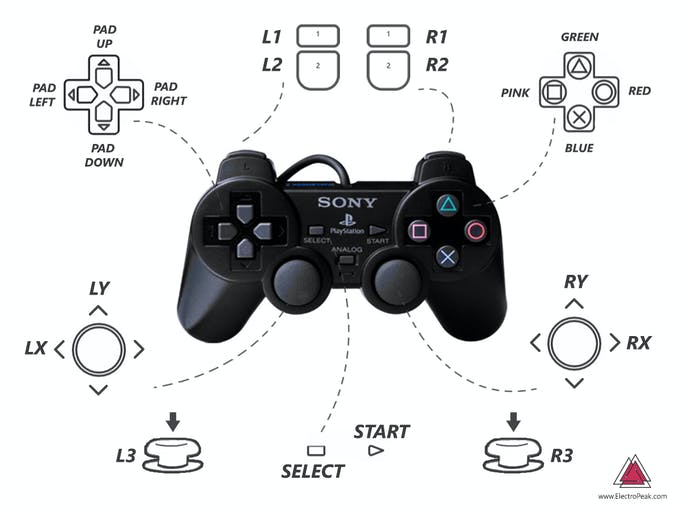
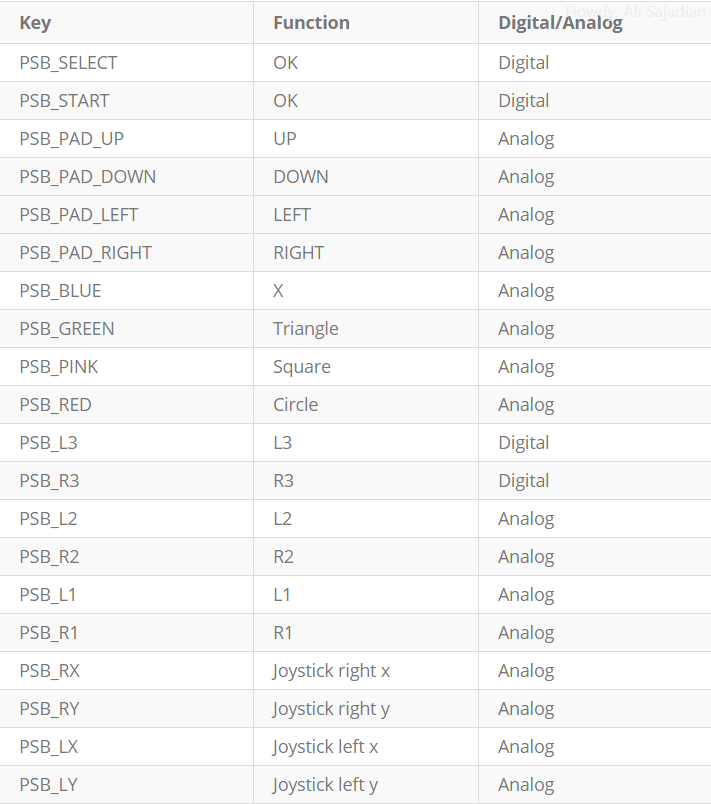
Sony game controllers have 12 analog keys sensitive to pressure, (4 keys for direction, 4 operation keys, Cross, Triangle, Circle, and Square, L1, L2, R1, and R2)
and 5 digital keys (MODE, START, SELECT, R3, L3)
and 2 analog joysticks.

There are 2 motors inside controllers that can make vibration because of their imbalance.

The wireless controller works with 2.4GHz frequency and it has a range of 10 meters.


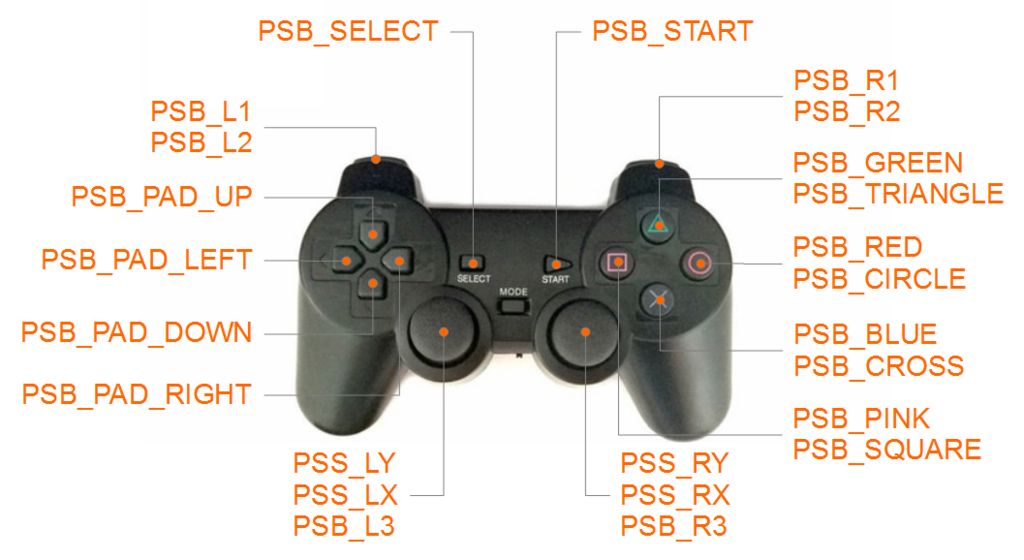
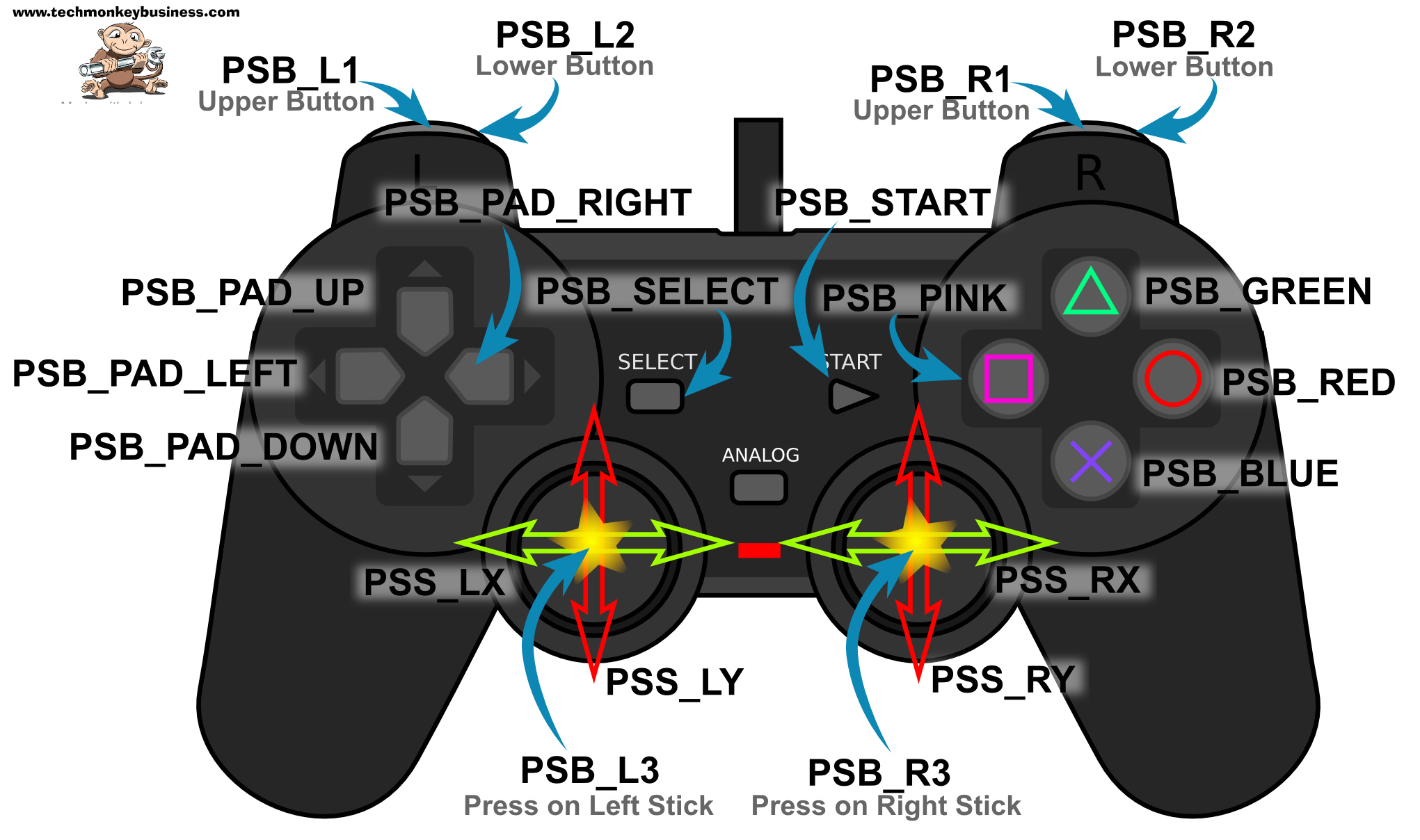
The buttons with the coloured shapes can also be referred to by the names
PSB_TRIANGLE,
PSB_CIRCLE,
PSB_CROSS,
and PSB_SQUARE.

The buttons can be pressed,ButtonReleased, pressed and held,
or pressed with a varying pressure,
so there are a number of methods that can be applied to the buttons
and joystick.
The methods are;
ButtonPressed, ButtonReleased,Button, NewButtonState,and Analog.
Here are some examples of how these are used.

ps2x.ButtonPressed(PSB_RED) is for a simple press of the red circle button.

ps2x.ButtonReleased(PSB_CIRCLE)

ps2x.Button(PSB_PAD_DOWN) is for the down button on the pad being pressed and held.

ps2x.NewButtonState(PSB_CIRCLE)

ps2x.Analog(PSAB_CROSS) is the command for measuring the pressure applied to the “X” button, if pressure sensitivity has been enabled. As you can see the “PSAB” form of the name has been used for the button.

ps2x.Analog(PSS_RY) is the command to obtaining readings off the right joystick  in the vertical direction.


雙搖桿 遙控輪型機器人


#include <PS2X_lib.h>  //for v1.6
#define PS2_DAT    8   
#define PS2_CMD   7  
#define PS2_CLK    6   
#define PS2_SEL    5
byte pressures=true;
byte rumble =true;
#define   DirR    12
#define   DirL    11
#define   PwmL   9
#define   PwmR  10

int valL;
int valR;
uint8_t dL;
uint8_t dR;
byte vibrate = 0;
PS2X  ps2x;

int error = 1;


void setup() {
 
  pinMode( DirL , OUTPUT);
  pinMode( DirR , OUTPUT);
  while(error==1){
   error = ps2x.config_gamepad(PS2_CLK, PS2_CMD, PS2_SEL, PS2_DAT, pressures, rumble);
      delay(500);
  }
}

void loop() {
  if(error == 1) //skip loop if no controller found
   return;
  ps2x.read_gamepad(false, vibrate);
       valL=ps2x.Analog(PSS_LY);
       valR=ps2x.Analog(PSS_RY);
       valL=map(valL,0,255,255,-255);
       valR=map(valR,0,255,255,-255);
       Serial.println(valL);
       Serial.println(valR);
       dL=1;
       if(valL<5 && valL>-5)
         valL=0;
       if (valL<0)
         {valL=-valL;
          dL=0;  
         }
     
       dR=1;
       if(valR<5 && valR>-5)
         valR=0;
       if (valR<0)
         {valR=-valR;
          dR=0;  
         }
     digitalWrite(DirL,dL);
     digitalWrite(DirR,dR);
     analogWrite(PwmL,valL);
     analogWrite(PwmR,valR);
     delay(50);
}


PS2+沿桌面逆時針
LED熄掉之前 按住 左邊Down鍵  沿桌面

#include <PS2X_lib.h>  //for v1.6
#define PS2_DAT    8  
#define PS2_CMD   7 
#define PS2_CLK    6  
#define PS2_SEL    5
byte pressures=true;
byte rumble =true;
#define   DirR    12
#define   DirL    11
#define   PwmL   9
#define   PwmR  10
#define   irin   A1
#define   led    A5
int val;
int valL;
int valR;
uint8_t dL;
uint8_t dR;
byte vibrate = 0;
PS2X  ps2x;
int sel=0;
int error = 1;


void setup() {
 
  pinMode( DirL , OUTPUT);
  pinMode( DirR , OUTPUT);
  pinMode( A5 , OUTPUT);
  analogWrite(PwmL,0);
  analogWrite(PwmR,0);
  digitalWrite(DirL,HIGH);
  digitalWrite(DirR,HIGH);
 
  while(error==1){
   error = ps2x.config_gamepad(PS2_CLK, PS2_CMD, PS2_SEL, PS2_DAT, pressures, rumble);
      delay(500);
  }
  digitalWrite(A5,HIGH);
  delay(2000);
  ps2x.read_gamepad(false, vibrate);
  if(ps2x.Button(PSB_PAD_DOWN)) sel=1;
  else sel=0;

  digitalWrite(A5,LOW);
}

void loop() {
  if(sel==1)
   {
    val=digitalRead(irin);
  if(val==HIGH)
  {
    analogWrite(PwmL,0);
    analogWrite(PwmR,255);
    }
  else
  {
    analogWrite(PwmL,255);
    analogWrite(PwmR,0);
  }
   
    }
  if(sel==0)
  {
  if(error == 1) //skip loop if no controller found
   return;
  ps2x.read_gamepad(false, vibrate);
       valL=ps2x.Analog(PSS_LY);
       valR=ps2x.Analog(PSS_RY);
       valL=map(valL,0,255,255,-255);
       valR=map(valR,0,255,255,-255);
       Serial.println(valL);
       Serial.println(valR);
       dL=1;
       if(valL<5 && valL>-5)
         valL=0;
       if (valL<0)
         {valL=-valL;
          dL=0; 
         }
    
       dR=1;
       if(valR<5 && valR>-5)
         valR=0;
       if (valR<0)
         {valR=-valR;
          dR=0; 
         }
     digitalWrite(DirL,dL);
     digitalWrite(DirR,dR);
     analogWrite(PwmL,valL);
     analogWrite(PwmR,valR);
     delay(50);
  }
}


搜尋 esp8266 ps2 controller

PS2 - WEMOS Controller(link) (gitHub)(zip)

PsxLib | A small and light lib for ESP32 and Ps2 Controller (link) (gitHub) (zip)


//D1Mini 
//lib : PS2X_ESP32.zip(link)

#include <PS2X_lib.h>  //for v1.6

/******************************************************************
 * set pins connected to PS2 controller:
 *   - 1e column: original
 *   - 2e colmun: Stef?
 * replace pin numbers by the ones you use
 ******************************************************************/
#define PS2_DAT        D1  //14    
#define PS2_CMD        D2  //15
#define PS2_CLK        D3  //17
#define PS2_SEL        D4  //16


/******************************************************************
 * select modes of PS2 controller:
 *   - pressures = analog reading of push-butttons
 *   - rumble    = motor rumbling
 * uncomment 1 of the lines for each mode selection
 ******************************************************************/
#define pressures   true
//#define pressures   false
#define rumble      true
//#define rumble      false

PS2X ps2x; // create PS2 Controller Class

//right now, the library does NOT support hot pluggable controllers, meaning
//you must always either restart your Arduino after you connect the controller,
//or call config_gamepad(pins) again after connecting the controller.

int error = 0;
byte type = 0;
byte vibrate = 0;

void setup(){
 
  Serial.begin(115200);
 
  delay(1000);  //added delay to give wireless ps2 module some time to startup, before configuring it
   
  //CHANGES for v1.6 HERE!!! **************PAY ATTENTION*************
 
  //setup pins and settings: GamePad(clock, command, attention, data, Pressures?, Rumble?) check for error
  error = ps2x.config_gamepad(PS2_CLK, PS2_CMD, PS2_SEL, PS2_DAT, pressures, rumble);
  //delay(1000);
  Serial.println(" ");
  Serial.println(error);
  if(error == 0){
    Serial.println("Found Controller, configured successful ");
    Serial.print("pressures = ");
    if (pressures)
      Serial.println("true ");
    else
      Serial.println("false");
    Serial.print("rumble = ");
    if (rumble)
      Serial.println("true)");
    else
      Serial.println("false");
    Serial.println("Try out all the buttons, X will vibrate the controller, faster as you press harder;");
    Serial.println("holding L1 or R1 will print out the analog stick values.");
    Serial.println("Note: Go to www.billporter.info for updates and to report bugs.");
  }  
  else if(error == 1)
    Serial.println("No controller found, check wiring, see readme.txt to enable debug. visit www.billporter.info for troubleshooting tips");
   
  else if(error == 2)
    Serial.println("Controller found but not accepting commands. see readme.txt to enable debug. Visit www.billporter.info for troubleshooting tips");

  else if(error == 3)
    Serial.println("Controller refusing to enter Pressures mode, may not support it. ");
 
//  Serial.print(ps2x.Analog(1), HEX);
 
  type = ps2x.readType();
  switch(type) {
    case 0:
      Serial.print("Unknown Controller type found ");
      break;
    case 1:
      Serial.print("DualShock Controller found ");
      break;
    case 2:
      Serial.print("GuitarHero Controller found ");
      break;
    case 3:
      Serial.print("Wireless Sony DualShock Controller found ");
      break;
   }
}

void loop() {
  /* You must Read Gamepad to get new values and set vibration values
     ps2x.read_gamepad(small motor on/off, larger motor strenght from 0-255)
     if you don't enable the rumble, use ps2x.read_gamepad(); with no values
     You should call this at least once a second
   */  
  if(error == 1) //skip loop if no controller found
    return;
 
  if(type == 2){ //Guitar Hero Controller
    ps2x.read_gamepad();          //read controller
   
    if(ps2x.ButtonPressed(GREEN_FRET))
      Serial.println("Green Fret Pressed");
    if(ps2x.ButtonPressed(RED_FRET))
      Serial.println("Red Fret Pressed");
    if(ps2x.ButtonPressed(YELLOW_FRET))
      Serial.println("Yellow Fret Pressed");
    if(ps2x.ButtonPressed(BLUE_FRET))
      Serial.println("Blue Fret Pressed");
    if(ps2x.ButtonPressed(ORANGE_FRET))
      Serial.println("Orange Fret Pressed");

    if(ps2x.ButtonPressed(STAR_POWER))
      Serial.println("Star Power Command");
    
    if(ps2x.Button(UP_STRUM))          //will be TRUE as long as button is pressed
      Serial.println("Up Strum");
    if(ps2x.Button(DOWN_STRUM))
      Serial.println("DOWN Strum");
 
    if(ps2x.Button(PSB_START))         //will be TRUE as long as button is pressed
      Serial.println("Start is being held");
    if(ps2x.Button(PSB_SELECT))
      Serial.println("Select is being held");
    
    if(ps2x.Button(ORANGE_FRET)) {     // print stick value IF TRUE
      Serial.print("Wammy Bar Position:");
      Serial.println(ps2x.Analog(WHAMMY_BAR), DEC);
    }
  }
  else { //DualShock Controller
    ps2x.read_gamepad(false, vibrate); //read controller and set large motor to spin at 'vibrate' speed
    
    if(ps2x.Button(PSB_START))         //will be TRUE as long as button is pressed
      Serial.println("Start is being held");
    if(ps2x.Button(PSB_SELECT))
      Serial.println("Select is being held");      

    if(ps2x.Button(PSB_PAD_UP)) {      //will be TRUE as long as button is pressed
      Serial.print("Up held this hard: ");
      Serial.println(ps2x.Analog(PSAB_PAD_UP), DEC);
    }
    if(ps2x.Button(PSB_PAD_RIGHT)){
      Serial.print("Right held this hard: ");
      Serial.println(ps2x.Analog(PSAB_PAD_RIGHT), DEC);
    }
    if(ps2x.Button(PSB_PAD_LEFT)){
      Serial.print("LEFT held this hard: ");
      Serial.println(ps2x.Analog(PSAB_PAD_LEFT), DEC);
    }
    if(ps2x.Button(PSB_PAD_DOWN)){
      Serial.print("DOWN held this hard: ");
      Serial.println(ps2x.Analog(PSAB_PAD_DOWN), DEC);
    }   

    vibrate = ps2x.Analog(PSAB_CROSS);  //this will set the large motor vibrate speed based on how hard you press the blue (X) button
    if (ps2x.NewButtonState()) {        //will be TRUE if any button changes state (on to off, or off to on)
      if(ps2x.Button(PSB_L3))
        Serial.println("L3 pressed");
      if(ps2x.Button(PSB_R3))
        Serial.println("R3 pressed");
      if(ps2x.Button(PSB_L2))
        Serial.println("L2 pressed");
      if(ps2x.Button(PSB_R2))
        Serial.println("R2 pressed");
      if(ps2x.Button(PSB_TRIANGLE))
        Serial.println("Triangle pressed");        
    }

    if(ps2x.ButtonPressed(PSB_CIRCLE))               //will be TRUE if button was JUST pressed
      Serial.println("Circle just pressed");
    if(ps2x.NewButtonState(PSB_CROSS))               //will be TRUE if button was JUST pressed OR released
      Serial.println("X just changed");
    if(ps2x.ButtonReleased(PSB_SQUARE))              //will be TRUE if button was JUST released
      Serial.println("Square just released");     

    if(ps2x.Button(PSB_L1) || ps2x.Button(PSB_R1)) { //print stick values if either is TRUE
      Serial.print("Stick Values:");
      Serial.print(ps2x.Analog(PSS_LY), DEC); //Left stick, Y axis. Other options: LX, RY, RX  
      Serial.print(",");
      Serial.print(ps2x.Analog(PSS_LX), DEC);
      Serial.print(",");
      Serial.print(ps2x.Analog(PSS_RY), DEC);
      Serial.print(",");
      Serial.println(ps2x.Analog(PSS_RX), DEC);
    }     
  }
  delay(50);  
}